The following gives general instructions on how to set up Excel to import data from StockIQ Rest API's. You can find more information on available API's by visiting the REST API Reference
GET Request
-
Open Power Excel. Select Data > From Web
- Enter your StockIQ API URL Into the URL field. Click OK. example: https://contoso.stockiqtech.net/api/AlertsSummary
Custom Report Example:
https://contoso.stockiqtech.net/api/CustomReportProducer?customReportId=1
Note: Support can provide you with the ReportId for your custom report.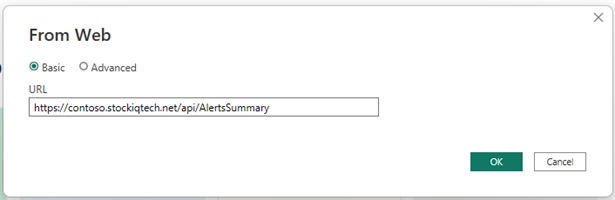
- Select Basic for the authentication type. Enter a StockIQ username and password. Click Connect.
Note: The SIQ User you select needs to be able to view the data you are trying to pull with the API.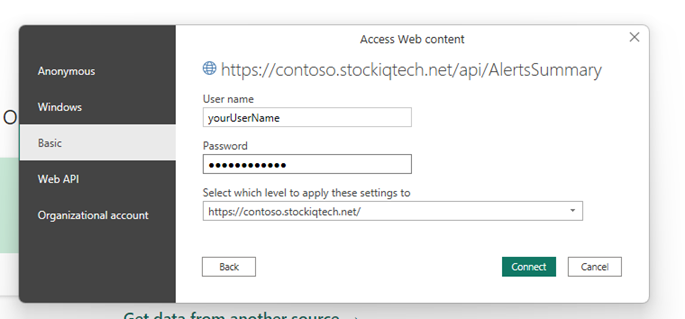
- Once data loads click on List > To Table
- Select None for delimiter, and Show as Errors for how to handle extra columns.
- Click OK and Select Extensions.
- Wait for column names to load uncheck "Use original column name as prefix" and click OK.
- Click Load & Close.
- To refresh the data from StockIQ go to Data > Refresh
POST Request (using PowerQuery)
- Create a new Excel Workbook
- Clear old cached credentials:
- Data > Get Data > Data Source Settings > hit ok if a warning dialog pops up
- In Data source settings dialog select Global Permissions
- Clear all existing permissions > Close
- Create the new data source: Data > Get Data > From Other Sources > Blank Query
- In the Power Query Editor
- Copy and Paste the code below: View > Advanced Editor. Edit as needed for desired API endpoint and body
- Set the Credentials:
- Hit Edit Credentials box when prompted to specify how to connect
- Anonymous > Connect
- Once you see data in the table hit Close and Load in the upper lefthand corner to save the query
- Once the query editor has closed, the table should automatically generate itself
Example A: Forecast Error Summary
let

    // Endpoint with query string
    url = "https://demo4.stockiqtech.net/api/ForecastErrorsSummary/fetchby/hierarchyNodeFilters/?itemHierarchyId=1&demandForecastSeriesId=1&nodeLevel=4",
    // API call with POST (empty body)
    response = Web.Contents(
        url,
        [
            Content = Text.ToBinary(""),   //  Forces POST, but empty body
            Headers = [
                #"Content-Type" = "application/json",
                #"Authorization" = "Basic <encoded auth here>"
            ]
        ]
    ),


    // Convert to string and parse as JSON
    rawText = Text.FromBinary(response),
    parsedJson = Json.Document(rawText),


    // Pull out the list of records from root or `data` field
    records =
        if Type.Is(Value.Type(parsedJson), List.Type) then
            parsedJson
        else if Record.HasFields(parsedJson, {"data"}) and Type.Is(Value.Type(parsedJson[data]), List.Type) then
            parsedJson[data]
        else
            {},

    // Find all distinct field names across all records
    allFields = List.Distinct(List.Combine(List.Transform(records, each Record.FieldNames(_)))),


    // Add missing fields with nulls
    normalized = List.Transform(
        records,
        each Record.Combine({
            _,
            Record.FromList(
                List.Transform(
                    List.Difference(allFields, Record.FieldNames(_)),
                    each null
                ),
                List.Difference(allFields, Record.FieldNames(_))
            )
        })
    ),

    // Turn normalized list into table
    result = Table.FromRecords(normalized)
in
    result
Example B: Underforecasted
let

    // Endpoint with query string (fixed URL)
    url = "https://demo4.stockiqtech.net/api/UnderforecastedPeriodDetail/fetchby/hierarchyNodeFilters/?nodeLevel=4&itemHierarchyId=1&demandForecastSeriesId=1",

    // API call with POST (no body, just empty content)
    response = Web.Contents(
        url,
        [
            Content = Text.ToBinary(""),   //  forces POST with empty body
            Headers = [
                #"Content-Type" = "application/json",
                #"Authorization" = "Basic <encoded auth here>"
            ]
        ]
    ),


    // Convert to string and parse as JSON
    rawText = Text.FromBinary(response),
    parsedJson = Json.Document(rawText),


    // Pull out the list of records from root or `data` field
    records =
        if Type.Is(Value.Type(parsedJson), List.Type) then
            parsedJson
        else if Record.HasFields(parsedJson, {"data"}) and Type.Is(Value.Type(parsedJson[data]), List.Type) then
            parsedJson[data]
        else
            {},


    // Find all distinct field names across all records
    allFields = List.Distinct(List.Combine(List.Transform(records, each Record.FieldNames(_)))),

    // Add missing fields with nulls (so table schema is consistent)
    normalized = List.Transform(
        records,
        each Record.Combine({
            _,
            Record.FromList(
                List.Transform(
                    List.Difference(allFields, Record.FieldNames(_)),
                    each null
                ),
                List.Difference(allFields, Record.FieldNames(_))
            )
        })
    ),

    // Turn normalized list into table
    result = Table.FromRecords(normalized)

in
    result